


AirDroid Parental Control
4.41.76K Reviews
App Specs
- Version
- 2.7.6.0
- Updated On
- License
- Free
- Downloads
- 10,000,000+
- Developer
- SAND STUDIO
- Categories
- Parenting
- Platform
- Android, iOS
Screenshots

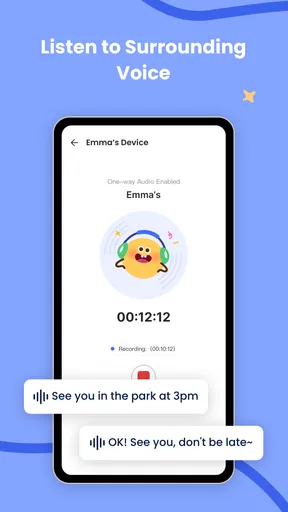
 Analysis by AppCompare
When a child’s day is split between a parent’s phone, a shared tablet and a device they take to school, supervision can quickly turn into guesswork. I like the idea of having location and app-use information in one place, but tools like this work best when everyone knows what is being monitored and why. AirDroid Parental Control is aimed at families who want a practical overview rather than another conversation based on assumptions.
One household, several devices
A realistic use case is a child using a family tablet after school and carrying a separate phone when visiting a friend. A parent may want to check whether the phone has arrived at an agreed destination, while another caregiver needs to know when the tablet should be put away for homework. AirDroid’s combination of location tracking and app controls can help with those different questions, provided the family sets expectations before relying on it.
It is worth deciding which device is actually being supervised. A shared tablet may also contain a parent’s apps, messages or accounts, so monitoring it as if it belonged only to a child can create awkward privacy problems. I would keep adult accounts and personal activity separate where possible, and talk through what the parent can see. Clear device boundaries matter more than adding every available control.
Caregivers should also agree who will respond to alerts. If two adults both assume the other has seen a location notification, the app has not improved coordination. A simple arrangement—one person checks routine updates, while the other is the backup—keeps tracking from becoming a source of duplicate messages or unnecessary worry. The app can provide information, but it cannot decide which adult is responsible for acting on it.
Using AirDroid in everyday family life
When I think about using AirDroid in everyday family life, I start with one practical question: which routine should it make easier, such as checking that a child has arrived or keeping a study period focused? That helps me choose a narrow, explainable purpose instead of turning every available tool into a household rule. From there, the next step is setting clear boundaries around the devices and information involved.
Getting Started with AirDroid Parental Control
First off, setting up AirDroid Parental Control is a breeze. You just download the app on both your phone and your kid’s device. A quick scan of a QR code, and you’re in business. The interface is intuitive, which means you don’t need a tech degree to figure things out. Trust me, if I can do it, anyone can.
Even when setup feels straightforward, I would treat the first session as a chance to establish the rules, not just connect devices. Tell your child what the location feature is for, when you plan to look at app activity, and what kinds of alerts deserve a conversation. For a shared device, agree whether the rules apply all day or only during the child’s use. This avoids turning a convenient setup into a surprise inspection.
Worth Reading Before You Choose

Baby Panda World Brings Quick Play to Modern Phones, but Its Game Library Feels Busy

ESPN’s Live Game View Makes Following Close Games Easier

QuizzLand Review: A Good Fit for Short Trivia Breaks, Not Every Player

Basketball Stars: Multiplayer Is Fast, but Can It Recover When Matches Go Wrong?

WEBTOON Turns Phone Updates Into a Better Reading Routine

Link to Windows Runs on Shared Habits, Not Social Feeds
A Peek into Its Features
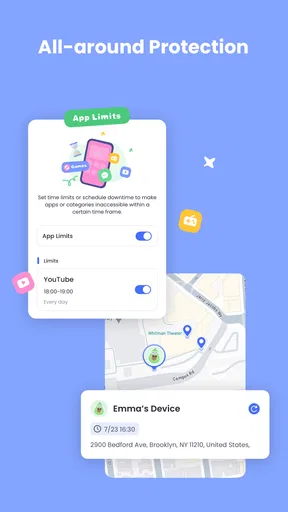
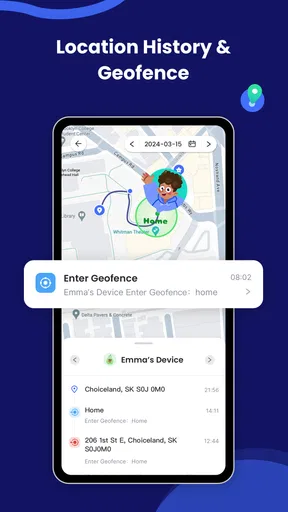
This app isn't just about keeping an eye on your kid's browsing history. Oh no, it goes way beyond that. You can track real-time location, which is a lifesaver for those days when your kid decides to wander off to who-knows-where. Plus, you can set up geofences. So if your little one strays out of the designated area, you get an alert. Neat, right?
For location tools, I find it helpful to think in terms of a specific routine rather than constant checking. If a child walks home from school or goes to an activity, a location check can answer a practical question: have they reached the expected place? A geofence can make that routine less dependent on repeatedly opening the app. Still, an alert is a prompt to verify, not proof that something is wrong; a late notification or a changed plan should lead to a calm check-in rather than an instant assumption.
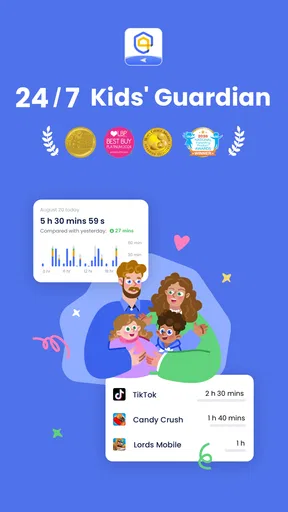
Another cool feature is the ability to monitor app usage. You can see what apps they’re using and for how long. Got a Fortnite addict? Now you can set time limits and even block apps during study time. It’s like having a digital nanny!
For a more useful screen-time routine, I would start with one clearly defined window, such as homework or bedtime, and review whether the restriction solves the actual problem. Blocking everything can interrupt schoolwork, a family call or an activity that needs a particular app. It is also useful to explain how the limit works before it takes effect, so a child is less likely to treat a sudden block as a punishment. The control is most effective when it supports an agreed routine, not when it replaces one.
Families comparing options may be choosing between built-in screen-time controls, a location-sharing tool and a dedicated parental-control app. Built-in controls can be enough if the main need is a basic limit on one device. A location-only option may suit a family that simply wants arrival check-ins. AirDroid makes more sense when a parent wants location context alongside app-use controls and monitoring tools, although that broader scope also calls for more discussion about boundaries. I would not install a wide-ranging tool just because it can do more; start with the concern you actually need to address.
Keeping It Safe and Sound
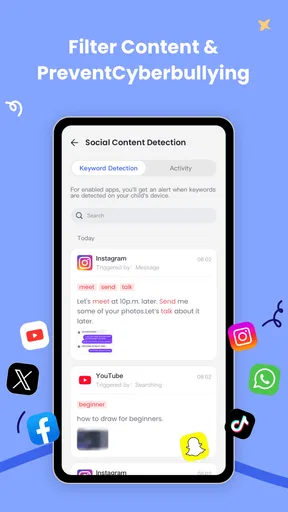
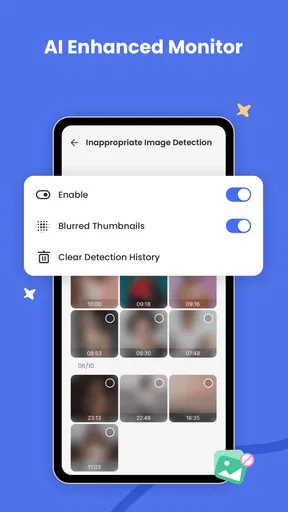
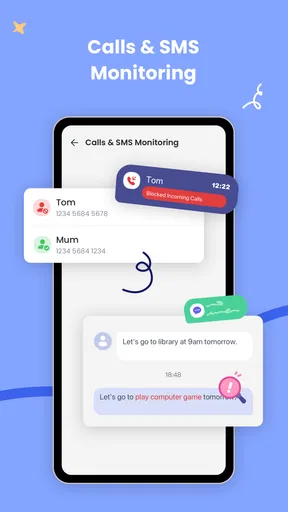
With cyberbullying and inappropriate content lurking around every digital corner, knowing what your kid is up to online is crucial. AirDroid lets you see text messages and call logs, so you’re always in the loop. Plus, you can set keyword alerts for potentially harmful content. It’s like having an extra pair of eyes.
Those features are sensitive, so I would not treat message or call visibility as a substitute for talking with a child. Alerts can provide a reason to check in, but a keyword by itself may lack context: a harmless conversation can include alarming language, while a genuine concern may not use a watched term. A better approach is to agree in advance what situations justify a closer look and to discuss concerns directly whenever it is safe to do so.
Age and maturity change the balance. A younger child may need more hands-on help with a phone and clearer limits around apps. An older child may respond better to a smaller set of agreed checks, with a gradual move toward managing their own time and safety. The app does not make that judgement for a family. I would revisit the rules as a child’s independence changes instead of leaving the same level of oversight in place indefinitely.
It is also sensible to ask whether a child’s device is genuinely theirs to use alone. On a phone shared between siblings, one person’s app activity or messages may not tell you who was using it. If the household cannot reliably separate users, interpreting reports becomes less straightforward. In that situation, a simple family agreement about turns and device use may be more helpful than treating every activity record as a precise account of one child’s behavior.
Does It Live Up to the Hype?
Honestly, for the most part, yes. It's reliable, doesn’t drain your phone’s battery, and the real-time updates are spot on. However, it’s not all rainbows and butterflies. Sometimes the app can be a little buggy, and the notifications might lag. But hey, no app's perfect, right?
That potential lag matters most when a parent expects an alert to function like an emergency service. I would use location updates for everyday reassurance and coordination, not as the only plan for a time-critical situation. A child should still know how to contact a caregiver, and adults should have a direct way to check whether a plan has changed. Likewise, if a notification seems inconsistent, verify the situation before drawing conclusions from it.
There is also a practical setup question: will every caregiver use the same approach? If one adult sets strict limits and another routinely overrides them, the child receives mixed signals and the app becomes another point of conflict. Agreeing on a small number of rules first—such as when app blocking applies and what location alerts are for—can make the controls easier to maintain than trying to manage every possible situation at once.
For the product context, AirDroid Parental Control is a free parenting app from SAND STUDIO, with optional in-app purchases priced from $9.99 to $89.99 per item. It has an average rating of 4.5 from around 125,000 ratings, and has been installed over 10 million times. Its content rating is Everyone, and version 2.6.4.0 supports Android 8.0 and later. Those figures suggest broad use, but they cannot tell you whether its monitoring style will suit your household; that depends on the age of the child, the devices involved and the trust you want to build.
Before choosing it, I would ask a few practical questions: is the main need location reassurance, limits on particular apps, or a way to notice possible online risks? Is the supervised device used by one child or shared? Will the child understand what is visible? If the answer is mostly about basic time limits on a single device, built-in controls may be simpler. If you want several kinds of oversight together and are ready to use them transparently, AirDroid is a more relevant fit. Keep in mind that optional purchases are available, so check the purchase choices in the app and decide what you need before paying for anything.
Who It Suits—and When I’d Choose Something Else
I would recommend considering AirDroid for a family that needs more than a timer: for example, a parent coordinating a child’s school commute while also setting a study-time app limit. It may also help when caregivers are trying to make household expectations consistent across a phone and tablet. The useful part is not simply seeing more; it is being able to connect a specific control to a clear family routine.
I would skip it if the household’s priority is minimal oversight, if a child is old enough that monitoring would undermine an agreement of trust, or if several people use the same device and their activity cannot be distinguished. It is also not the right substitute for an urgent response plan, a conversation about online behavior or direct support when a child is in danger. In those cases, a simpler setting, a direct check-in or help from a trusted adult may be the better first step.
Does It Live Up to the Hype?
One thing I really appreciate is that it respects privacy. You’re not snooping on everything, just the essentials, and it gives you peace of mind without being invasive. It’s all about balance, my friends.
I would put that balance in the hands of the family rather than assume the app creates it automatically. Location checks, app limits, message visibility and keyword alerts each involve a different level of access. Choosing only the tools that answer a real concern—and telling the child what those tools do—can make oversight feel more proportionate. If a control no longer serves a purpose, reconsider it instead of keeping it simply because it is available.
Final Thoughts
If you’re looking for a way to keep your kid safe in the digital world without turning into Big Brother, AirDroid Parental Control is worth a shot. It combines essential features with an easy-to-use interface, making digital parenting a tad bit easier. Give it a whirl and see how it fits into your parenting toolkit.
My household verdict is that AirDroid is most useful when adults have a concrete reason for each setting and children know the ground rules. Its mix of location tools and app oversight can support everyday coordination, but it asks parents to use judgement, especially on shared devices and as children grow more independent. If your family wants that broader set of controls and can discuss them openly, it is worth trying; if you only need a basic limit or a low-monitoring arrangement, a simpler option may feel more respectful and easier to maintain.
Pros
- Comprehensive monitoring tools.
- Real-time location tracking.
- User-friendly interface.
- Customizable screen time limits.
- Remote device management.
Cons
- Requires constant internet connection.
- Limited features on iOS.
- Can be intrusive for older kids.
- Subscription required for premium features.
- Complex setup for non-tech users.
FAQs for AirDroid Parental Control
What features does AirDroid Parental Control offer?
AirDroid Parental Control provides a variety of features designed to help parents monitor and manage their children's device usage. Key features include real-time location tracking, screen time management, app usage monitoring, and the ability to block inappropriate content. It also offers instant alerts for suspicious activities, ensuring a safer online experience for kids.
Is AirDroid Parental Control compatible with both Android and iOS devices?
Yes, AirDroid Parental Control is compatible with both Android and iOS devices. It allows parents to monitor multiple devices from a single app interface, making it convenient for families with different types of devices. However, some features may vary slightly between platforms due to system restrictions.
How easy is it to set up AirDroid Parental Control?
Setting up AirDroid Parental Control is straightforward. After downloading the app, you’ll need to create an account and pair your child’s device with yours using a simple QR code or pairing code. The app provides step-by-step instructions to ensure a seamless setup process, making it user-friendly even for those less tech-savvy.
Is AirDroid Parental Control secure and private?
AirDroid Parental Control prioritizes user security and privacy. All data transmitted between devices is encrypted, ensuring that sensitive information is protected. The app adheres to strict privacy policies, meaning that your data is not shared with third parties, providing peace of mind for parents concerned about security.
Does AirDroid Parental Control offer customer support?
Yes, AirDroid Parental Control offers comprehensive customer support. Users can access support through various channels including email, live chat, and an extensive online help center. The support team is responsive and ready to assist with any issues or questions users may encounter, enhancing the overall user experience.


